Support access
Let the host's support staff sign in for a limited time, with everything recorded.
How it helps
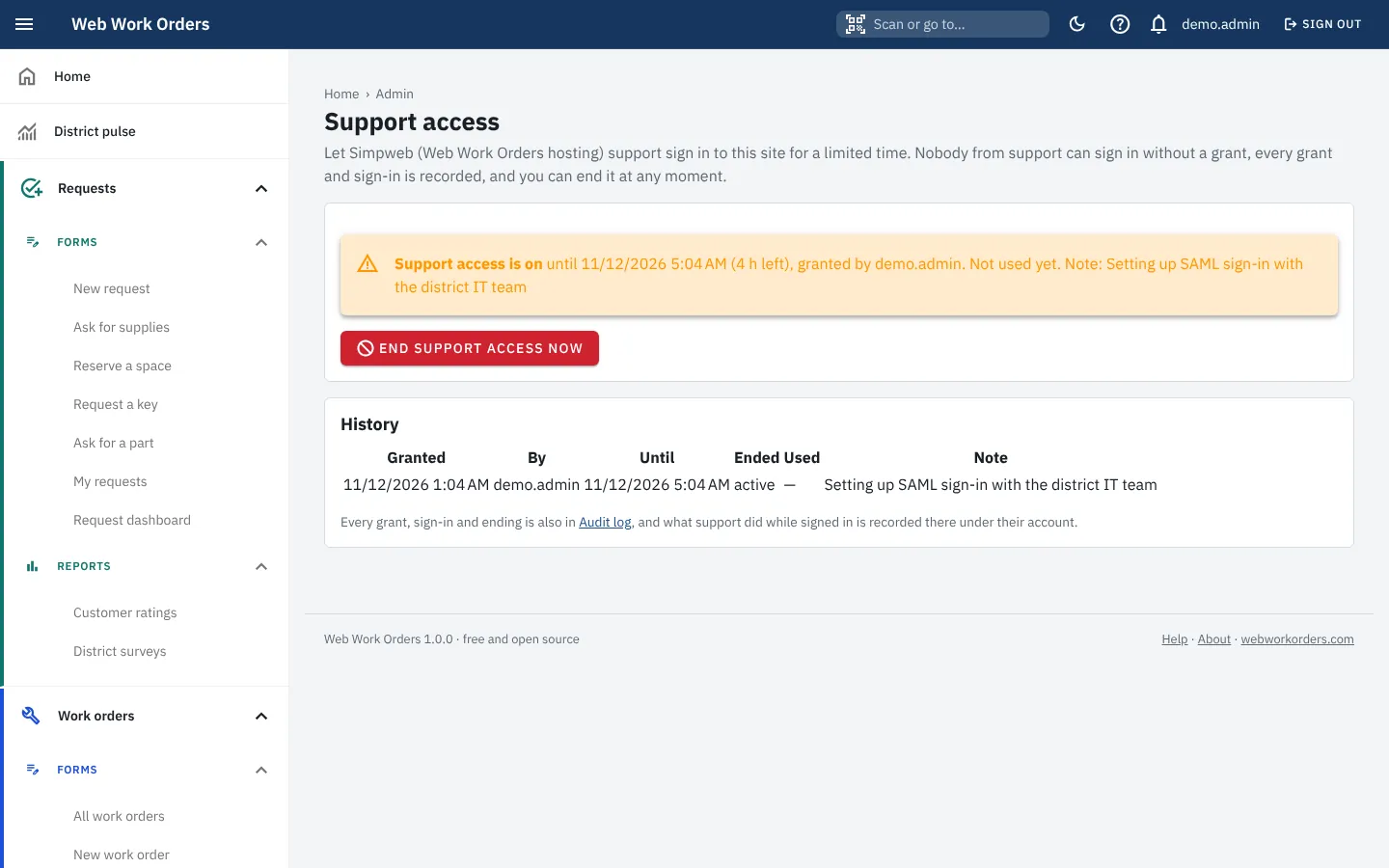
On a hosted site, the host's support staff cannot sign in at all until a district admin grants access, for 1 to 72 hours. Every grant and sign-in is recorded, and the admin can end it on the spot, so help never means standing access to student-adjacent data.
Who uses it
How to use it
- Support accounts (listed by the host in the site's settings) cannot sign in at all until an admin grants access here.
- A grant lasts 1 to 72 hours and makes those accounts admins for that time. End it early with End support access now.
- Every grant, sign-in and ending is in the history and the audit log; what support did is recorded under their account.
- Self-hosted sites have no support accounts, so this page only shows that nobody outside the organization can sign in.
Fields on this screen
- Hours
- How long the host's support staff may sign in, from 1 to 72 hours. It ends on its own; you can end it sooner.
- Note
- What support is helping with, kept with the grant in the history and the audit log.
Where to find it
In the app at /admin/support. Every screen has a ? in the header with help for that page.
Terms on this page
Related
Next in Setup and security: SAML sign-in →
Screenshots come from the Pine Valley Schools demo, a made-up district. Something unclear or out of date? Tell us and we'll fix it.