Work orders for school districts. Free. Forever.
Every feature. Unlimited buildings, technicians and requesters. Runs on your server or ours. Your data stays yours.
- Open source, MIT license
- No per-user pricing
- No sales call
- Reads your existing TeamWORKS database
- Requested by
- Any teacher, from any phone
- Location
- Any building, any room
- Problem
- Paying thousands a year for a form
- Assigned to
- Your maintenance team, unlimited seats
- Parts
- SQL Server you already own
- Labor
- One afternoon to install
- Cost
- $0.00, every year
Why districts are looking for something else
You’re paying for a form.
Districts pay thousands a year for software whose core job is “teacher reports a leak, somebody fixes it.” One Missouri district’s 2024 board memo recommended a $95,715.99 quote for work orders, events and assets.
Nobody will tell you the price.
Most K-12 work order systems are priced by quote or by student enrollment. You can’t compare what you can’t see.
ESSER is gone.
The federal relief money has run out. Software subscriptions are the first line boards cut. We’d like to be the easiest “yes” on the budget.
See it
Real screens from Pine Valley Schools, our made-up demo district. Nothing mocked up.
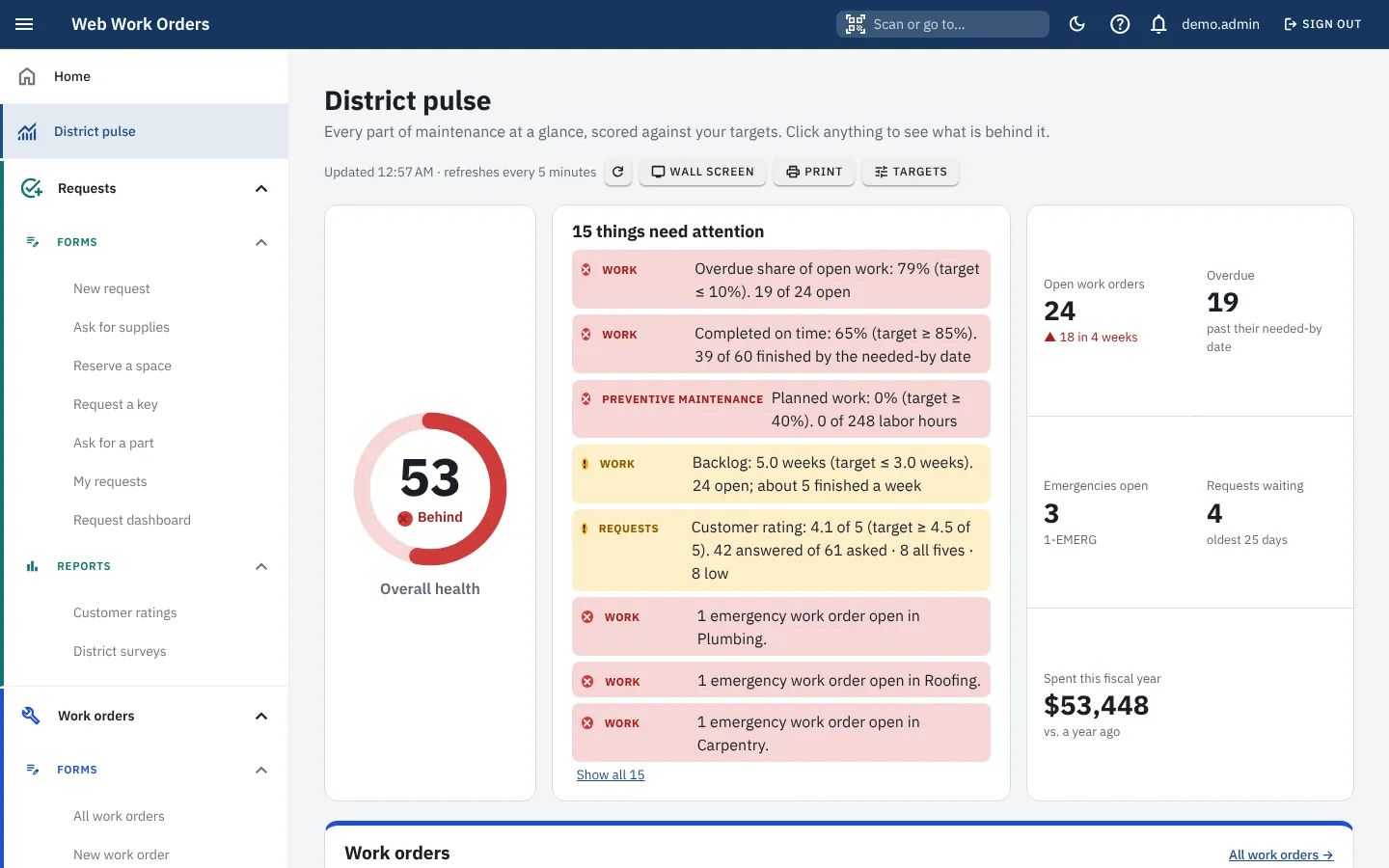
The district pulse
A health score, gauges against your own targets, and what needs attention first, school by school.
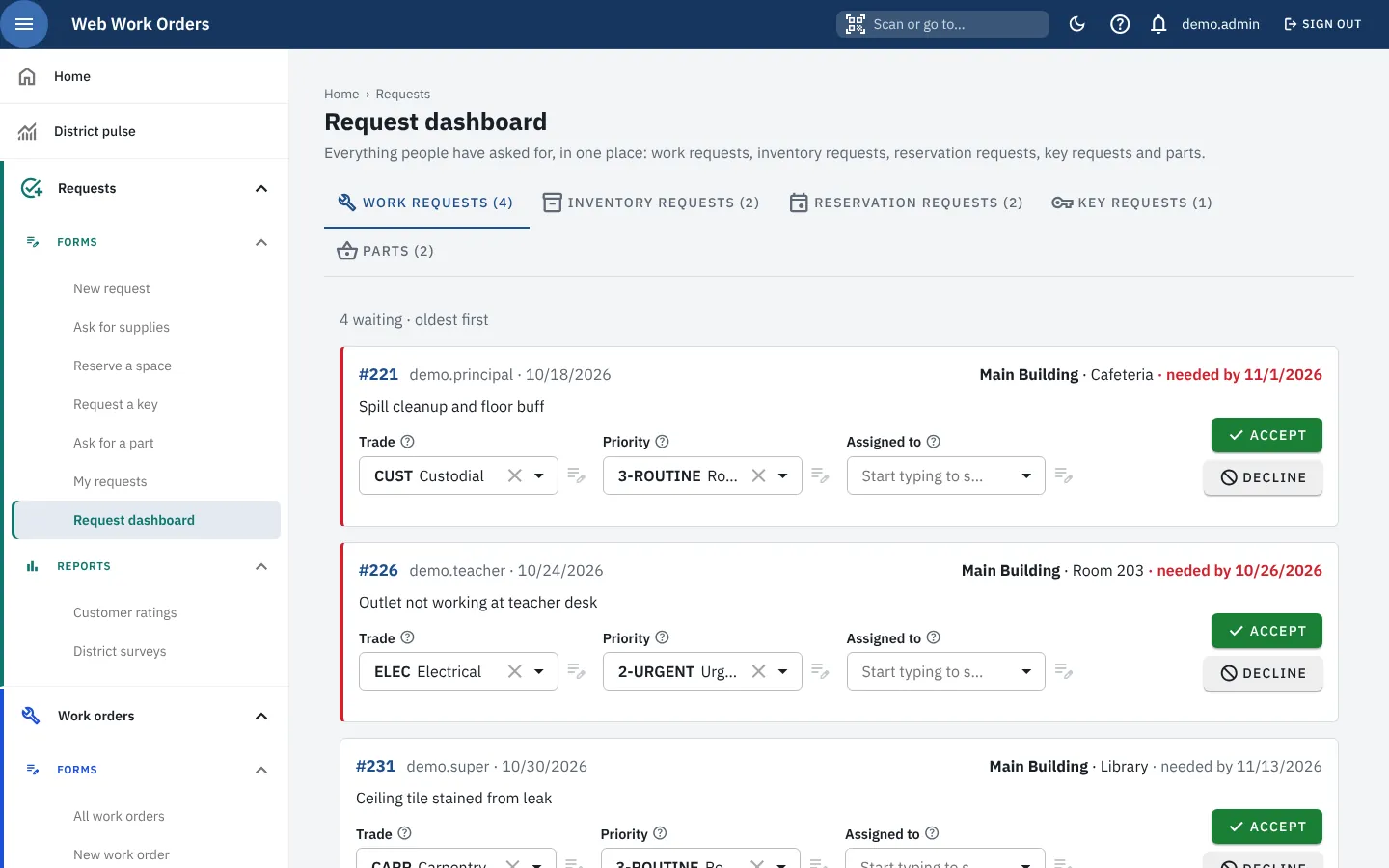
One request dashboard
Accept a teacher’s request with its trade, priority and technician in one step, or decline it with a reason.
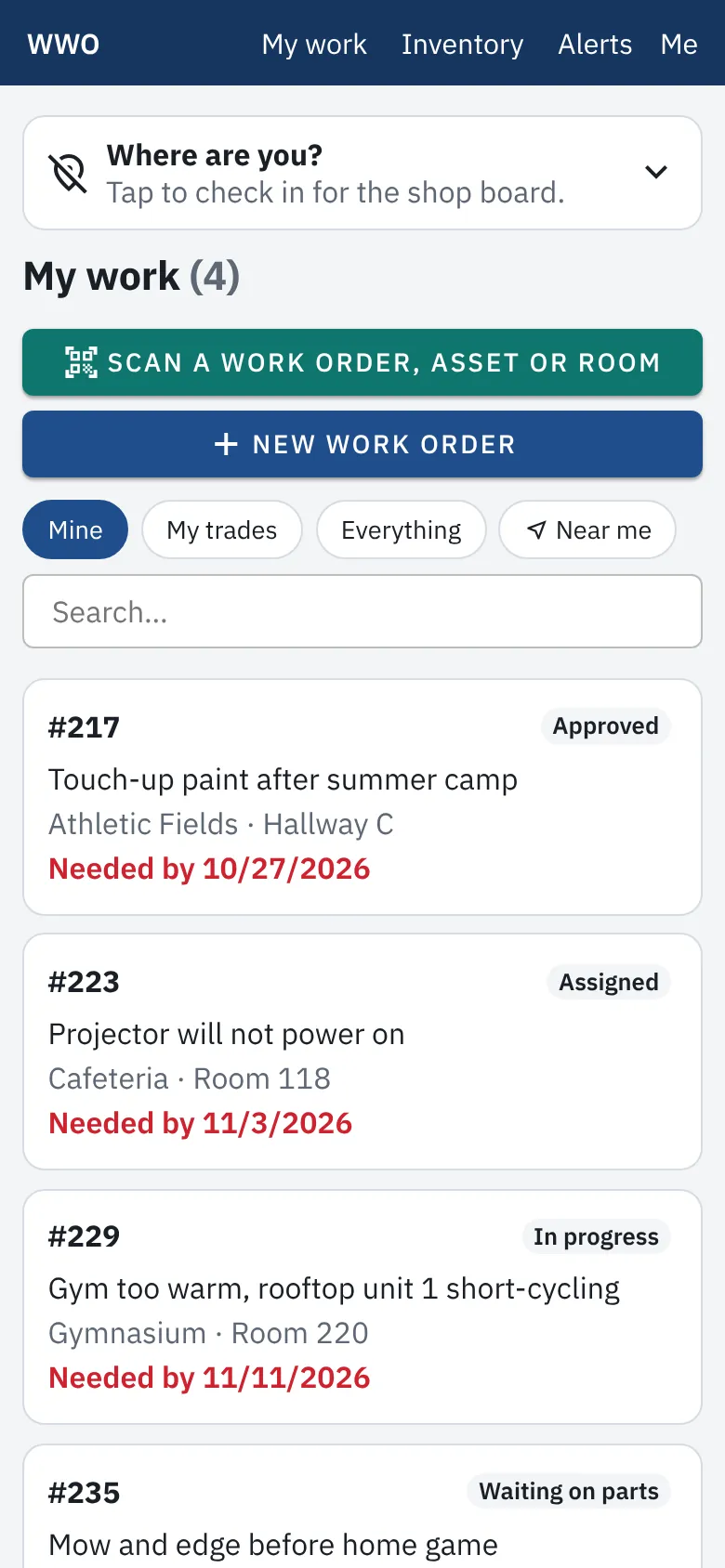
The Mobile App
A technician’s work on their phone: status, hours, parts and a signature on the spot. No app store.
Where the money goes, and where it stops
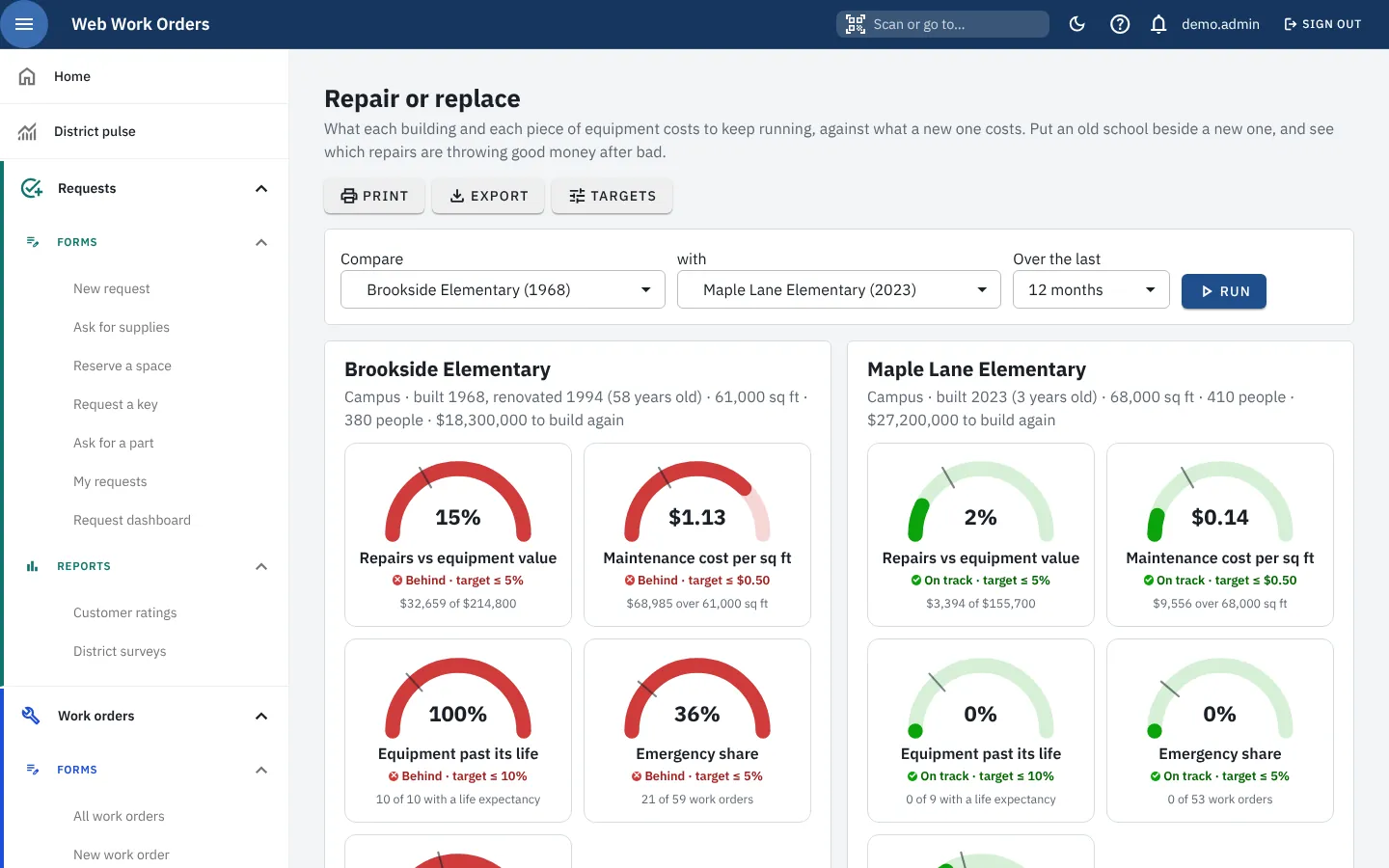
Put your oldest school beside your newest and see which equipment is cheaper to replace than to keep fixing. The numbers below are from our demo district; yours come from your own repair history.
$1.13 vs $0.09
Maintenance cost per square foot at a 1968 elementary against a 2023 one.
4.9 years
How long a new $68,000 boiler takes to pay for itself in repairs the old one no longer needs.
$19,590 a year
Saved by replacing the three pieces of equipment the report marks Replace.
Everything a facilities office needs. Nothing held back.
The whole product, in the free version. The hosted version is the same software; the only difference is who runs the server.
- The district pulseA health score, gauges against your own targets, and a plain-words list of what needs attention, school by school. One click makes it a wall screen for the shop.
- Work ordersCreate, assign, track, complete, reopen. Routing rules send each request to the right technician the moment it arrives. Labor, stock, purchases and travel charged to the right account, sub work orders, saved searches, print layouts and batch print.
- Requests from staffOne form you design. Work, supply and reservation requests on one dashboard. Teachers follow everything under My requests, hear about each decision, and rate the work when it’s done.
- Facility rentalsA public page for every gym, cafeteria and field. Requests with the price up front, step-by-step approvals, no double bookings, setup work orders, card payments through your own Stripe account, a portal for the groups that rent, and one calendar. See how.
- Preventive maintenanceAny schedule: every N days or miles, “the second Tuesday”, or weeks 23 to 33 for summer field work. Task lists, a cost forecast, and generation you can aim at one building or one trade.
- Assets and inventoryEquipment and vehicles with service history. Stock by location with low, out and over flags and alerts. Barcode and QR labels, a scan box on every page, and the phone camera as the scanner. A map of open work with directions, and floor plans with every room and unit pinned.
- Purchasing, keys and utilitiesPurchase orders from draft to closed, with the shelves writing the restock order, parts technicians ask for, kits, quotes, the card statement reconciled and exports to accounting. A key cabinet with approval steps and signed receipts. Utility bills by school, weather-adjusted, and fuel tanks that warn before they run low. All on the tables your district already has.
- On the phoneThe Mobile App for technicians: my work, log hours, use materials, sign off, right from the home screen. Mobile Inventory for the storeroom and the truck. Light or dark, per device. Each switches on or off per district.
- NotificationsIn-app, email, text message, phone and desktop push, team chat. Quiet hours and a daily digest, so nobody gets buzzed at 2 a.m. Every email logged, and the failed ones sent again in one click.
- ReportsExecutive reports for the board, repair or replace and a capital plan for the budget, a warranty finder, technician productivity, attendance, the yearly district survey, every report the earlier version had, build-your-own with two-level grouping, and any report emailed daily, weekly or monthly.
- Sign-in and securityActive Directory, LDAP, SAML (AD FS, Shibboleth, ClassLink, Clever), Entra ID, Google or CAS. Staff limited to their own trades and schools, fields locked per person, old passwords upgraded at first sign-in, and every edit to your data copied to history first.
- Spark, the optional assistantAsk about your own work and see what it checked. Help chat, and “describe the problem” drafting from your own codes. Read only, your key, off until you turn it on.
- Help on every fieldA ? beside each one, reworded by your admins if you like. A help drawer on every page.
- Your existing databaseReads the columns you already have, adds only its own tables, never deletes. SQL Server 2012+, free Express works.
Meet Spark, the assistant that lives in your work orders.
A teacher types “sink in 214 won’t stop running.” Spark drafts the work order: description, trade, priority and room, using your district’s own codes. The person reviews it and saves. Ask Spark “how do I set up a PM for roof drains?” and it walks you through it.
Spark runs on your district’s own AI account, so it costs you only what you use, your data goes only where you’ve agreed it can, and it stays switched off until an administrator turns it on. Everything else in Web Work Orders works without it.
Ask it about your own work, too: “what’s open at the high school?”, “what did plumbing cost last month?” Spark looks only through the same read-only reports your staff already use, with the asker’s own access, and says under every answer what it checked. It can’t assign, close or change a thing.
Why it’s free
Because school facilities software shouldn’t cost more than the roof repairs it tracks.
The software is free under the MIT license. Every feature, every user, forever. We make a living on hosting, support, migration and training for districts that would rather not run a server. That’s the whole business model.
Still on TeamWORKS?
Web Work Orders reads your existing TeamWORKS database. Your work order history, assets, buildings and users come with you on day one. Nothing is deleted, and your old system keeps working during the switch.
How it compares
| Web Work Orders | Typical K-12 vendor | |
|---|---|---|
| License cost | $0 | Quote only |
| Requester accounts | Unlimited | Often limited or billed |
| Self-host option | Yes | No |
| Data export | Everything, any time | Varies |
| Source code | Open, MIT license | Closed |
| Sales call to get a price | No | Yes |
Be one of the first districts
Run Web Work Orders beside your current system on a copy of your data for 30 days. We’ll help you set it up, and what you find shapes the next release.
Already running it? Tell the next district what you think.
Stop paying for a form.
Try the demo in two minutes. Install it in an afternoon. Keep every dollar.