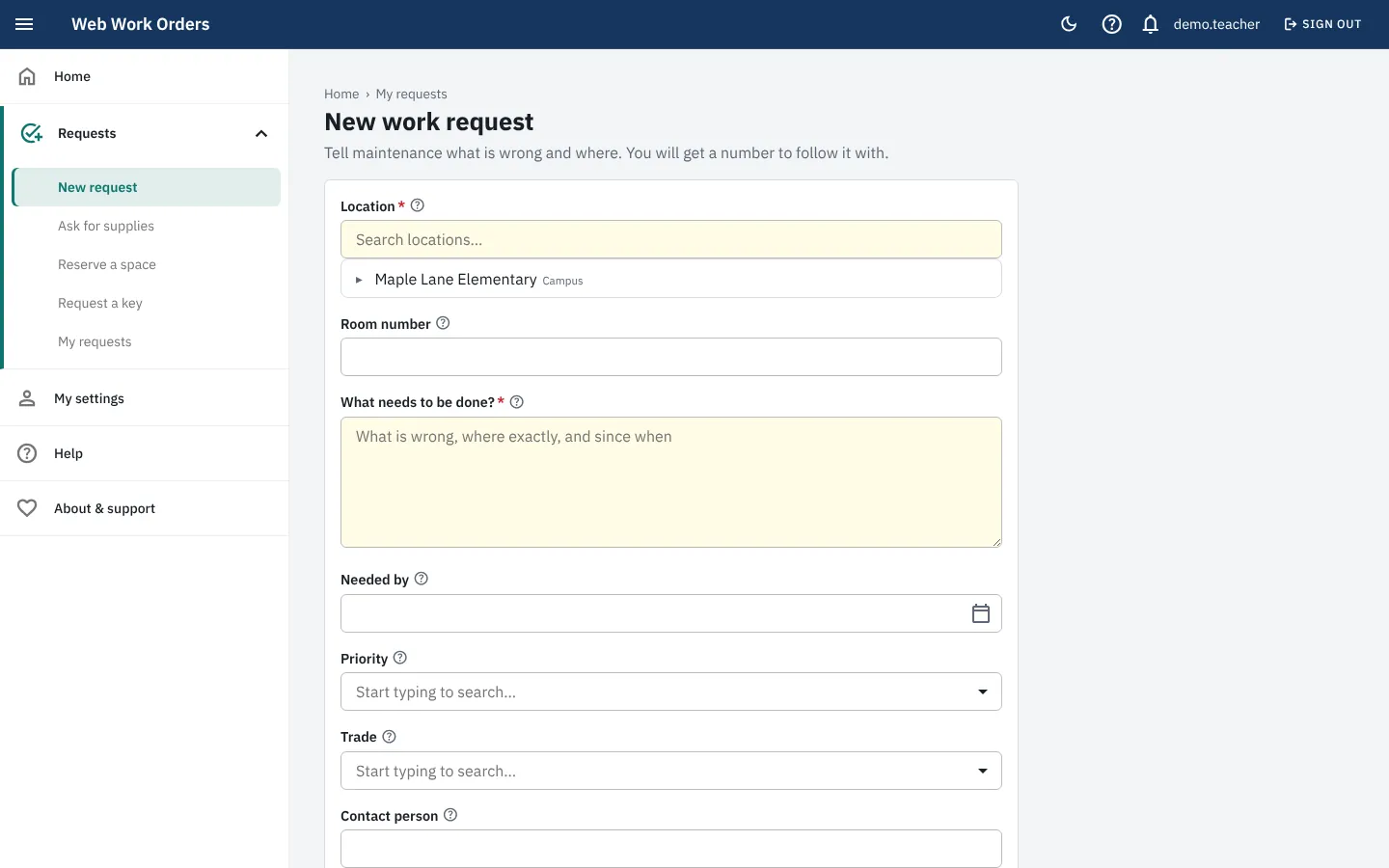
New work request
Ask maintenance for work at a location you are allowed to request for.
How it helps
A request that takes under a minute gets submitted instead of mentioned in the hallway. Teachers only see the buildings they may request for, the form asks for exactly what the office needs, several problems in one room go in at once, and they get a request number to follow instead of a phone call to make.
Who uses it
Teachers and staff (requesters)
How to use it
- Describe the problem and exactly where it is. Mention anything unsafe.
- You only see locations your admin assigned to you. Ask them if a building is missing.
- After you submit, you get a request number and can add photos.
- Follow progress under My requests. You are notified when it is assigned and when it is done.
Fields on this screen
- Location
- Pick the building where you need the work. You only see the locations you are allowed to request for; ask your admin to add others.
- Room
- Room number or area, so the technician can find the problem without calling you.
- Photos or files
- Pictures of the problem, or a document that explains it. They are attached to the request when you submit it.
- Custom field 1
- A question your district added to the request form. The admin sets its name and choices under Admin → Request form.
- Custom field 2
- A question your district added to the request form. The admin sets its name and choices under Admin → Request form.
- Custom field 3
- A question your district added to the request form. The admin sets its name and choices under Admin → Request form.
- Custom field 4
- A question your district added to the request form. The admin sets its name and choices under Admin → Request form.
- What needs to be done?
- Describe the problem and where exactly it is. Mention anything that affects safety or stops a class, and when you noticed it.
- Needed by
- If the work must be done by a certain date (an event, an inspection), enter it. Leave blank for "as soon as practical".
- Priority
- Choose the highest priority only for safety hazards and things that stop a room from being used. Everything else is normal priority.
- Contact
- Who should the technician see on site, if not you?
- More problems here
- Something else wrong at the same place? Add it here. Each problem becomes its own work order with its own number, so each goes to the right trade.
Where to find it
In the app at /requests/new. Every screen has a ? in the header with help for that page.
Terms on this page
Work orderTradePriorityRoomHazard
Related
Next in Requests: My requests →
Screenshots come from the Pine Valley Schools demo, a made-up district. Something unclear or out of date? Tell us and we'll fix it.