Vendor record
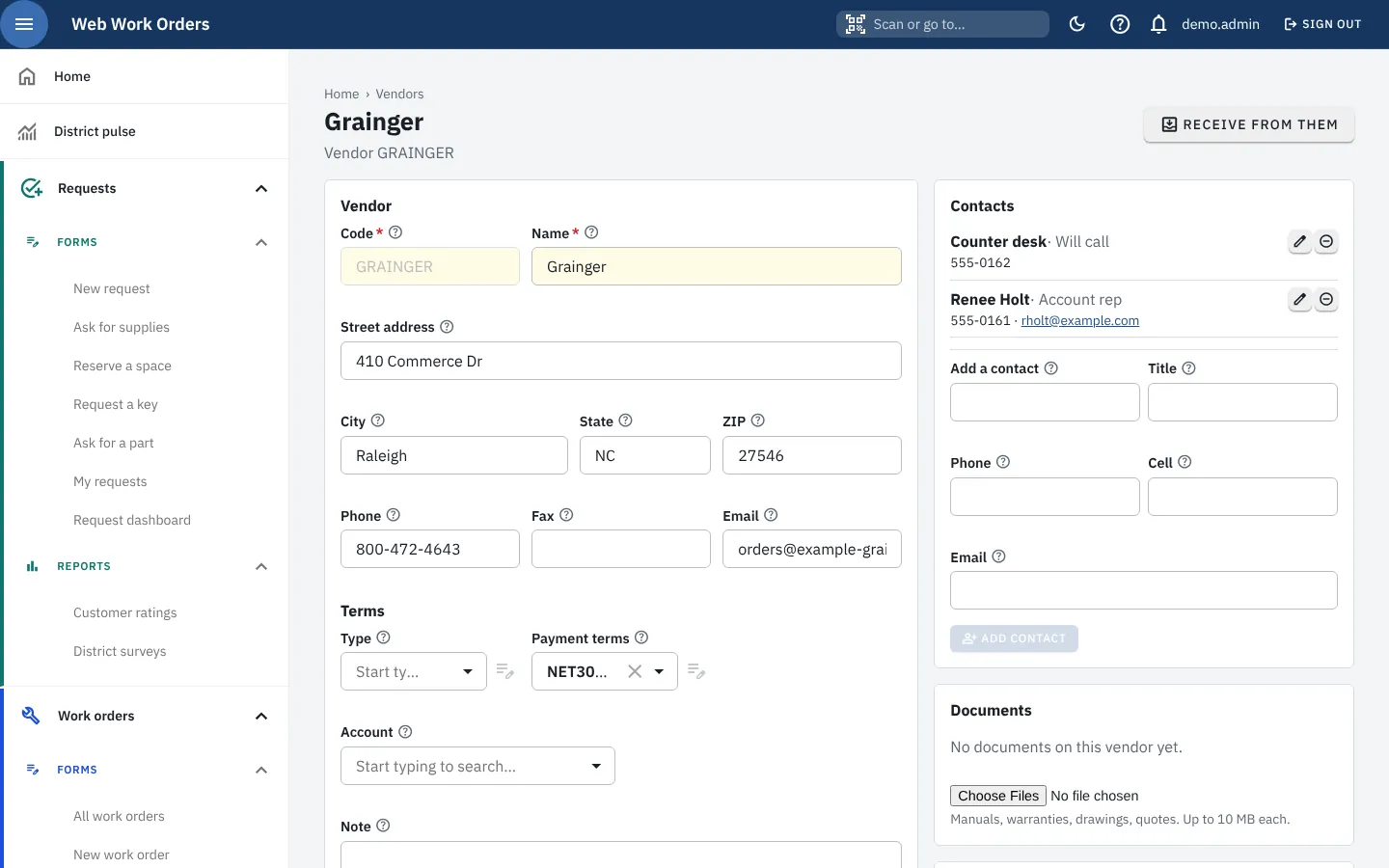
One vendor: address, phone and email, payment and delivery terms, contacts, the items they supply and what has been bought from them.
How it helps
Address, phone and email, payment and delivery terms, credit limit and minimum order, the people to call there, the items they supply as main or other vendor, what was bought from them, and their documents. Everything needed to place, receive and pay an order is on one page.
Who uses it
Stockroom (inventory clerks)SupervisorsFinanceAdministrators
How to use it
- The code cannot change once a vendor is added, because purchases and items refer to it.
- Make a vendor inactive instead of removing it; old purchases keep showing it.
- Contacts are the people you call there. Taking one off the list keeps the earlier row.
- What we have bought counts purchases on work orders and deliveries received from them.
Fields on this screen
- Code
- A short code for the vendor, such as GRAINGER. Purchases and items refer to it, so it cannot change after the vendor is added.
- Name
- The vendor's name as it appears on their invoices.
- Street address
- Where the vendor is, or where orders and payments are sent.
- City
- The vendor's city, shown in vendor lists and pickers.
- State
- The vendor's state, shown in vendor lists and pickers.
- ZIP
- The vendor's ZIP or postal code for their mailing address.
- Phone
- The vendor's main number. People to ask for go under Contacts.
- Fax
- The vendor's fax number, if they still take orders that way.
- The vendor's main email address for orders and questions.
- Type
- The kind of vendor (supply house, contractor, utility), from Code lists.
- Payment terms
- How soon the vendor expects payment, such as Net 30, from Code lists.
- Delivery terms
- How the vendor delivers, such as FOB destination, from Code lists.
- Account
- The account purchases from this vendor are usually charged to.
- Credit limit
- How much credit the vendor extends to the district.
- Minimum order
- The smallest order the vendor will take.
- Surcharge
- A fee the vendor adds to each order, such as a small-order or fuel charge.
- Federal tax ID
- The vendor's federal tax ID (EIN) for the business office's 1099s.
- Note
- Anything worth knowing about this vendor: hours, account number, who to avoid.
- Contact name
- Someone to ask for at the vendor.
- Title
- What the contact does there, such as account rep or will call.
- Phone
- The contact's direct number or extension.
- Cell
- The contact's cell phone, for deliveries on site.
- The contact's own email address, for quotes and orders.
Where to find it
In the app at /vendors/…. Every screen has a ? in the header with help for that page.
Terms on this page
Related
Screenshots come from the Pine Valley Schools demo, a made-up district. Something unclear or out of date? Tell us and we'll fix it.