Reservation
One reservation: details, fees, payments, insurance and the approval history.
How it helps
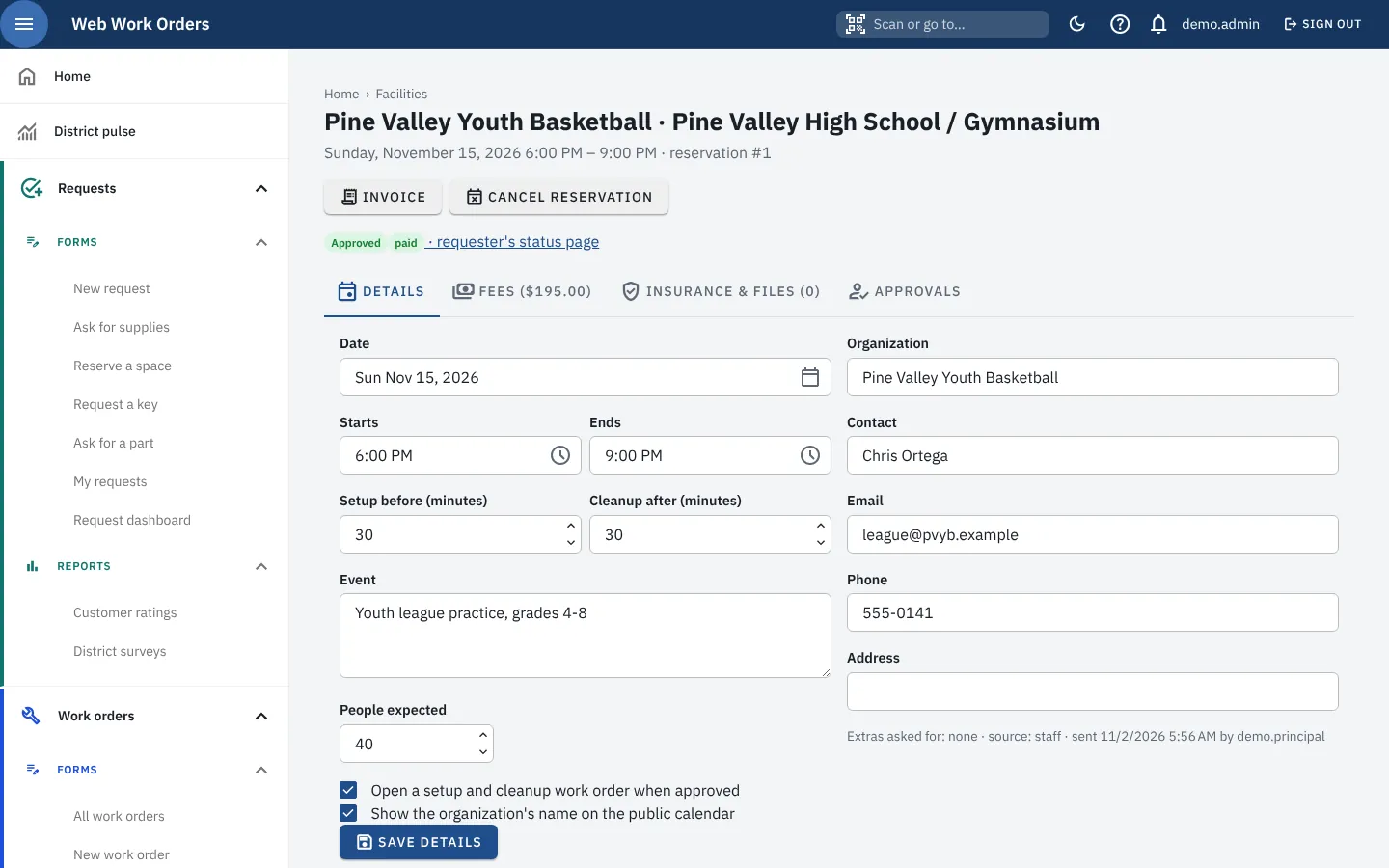
One reservation with its details, fees, payments, insurance and approval history. Approvals go step by step (principal, then facilities office, or as many steps as the district uses), and approving an event that needs setup opens a work order for the custodial team.
Who uses it
SupervisorsAdministratorsFinance
How to use it
- Approve or decline the step it is waiting at. The last approval schedules it, opens a setup work order if one is needed and tells the requester.
- Fees are kept in the earlier version's cost columns. Price again from the rates after changing the time, or type amounts yourself.
- Record checks, purchase orders, transfers, cash, card or a waiver. Once payments cover the fees it is marked paid. A mistaken payment is voided, never deleted.
- Upload the certificate of insurance with its expiry date. The last approval checks that it covers the event day.
- Invoice opens a printable invoice; Mark invoiced records that it was sent.
Where to find it
In the app at /facilities/events/…. Every screen has a ? in the header with help for that page.
Terms on this page
Work orderRequesterReservationCertificate of insurancePurchase order
Related
Next in Facilities and events: Reservations and fees →
Screenshots come from the Pine Valley Schools demo, a made-up district. Something unclear or out of date? Tell us and we'll fix it.