Ask for a part
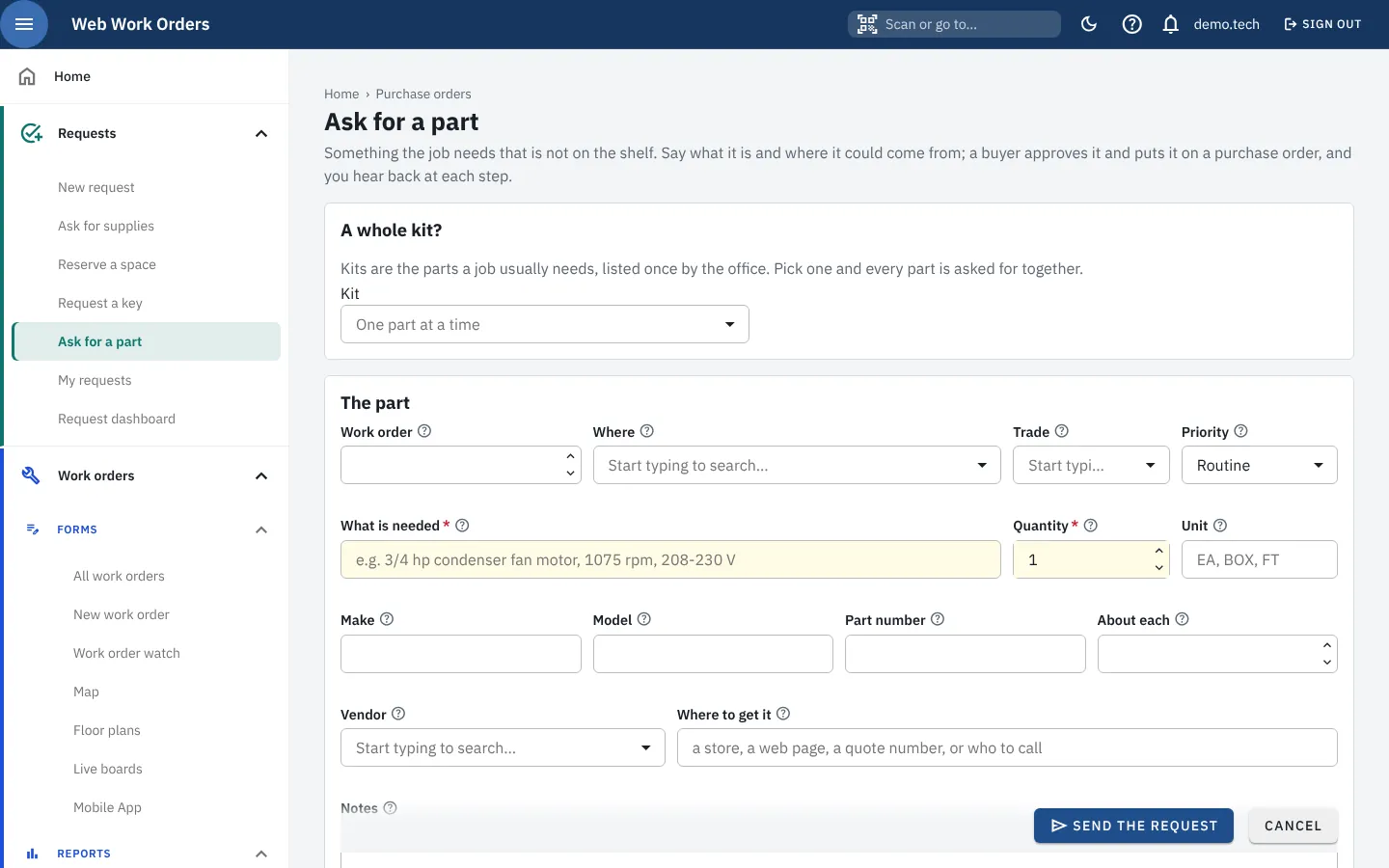
Something a job needs that is not on the shelf: say what it is, how many, for which work order, and where it could come from; or pick a kit and ask for every part of it at once. A buyer approves it and puts it on a purchase order; you hear back at each step under My requests › Parts.
How it helps
The technician on a roof who needs a motor that is not on the shelf says what the job needs: the part, make, model and number, how many, about how much, where it could come from, for which work order, and whether the job is stopped without it. A buyer takes it from there, and the requester hears each step.
Who uses it
How to use it
- Give the work order number first: the location and trade fill in, and the part lands on that job when it arrives.
- The make, model and part number help the buyer find the right thing; the part number is also how repeat requests are counted on the Asked for most often report.
- Emergency means the job is stopped until the part arrives. It goes to the top of the buyer's queue.
Fields on this screen
- Work order
- The job this part is for. The location and trade fill in from it, and the purchase lands on this work order when the part comes in.
- Where
- The building the part is for, when there is no work order or it is for the shop itself.
- Trade
- Whose kind of work this is; the buyer for that trade sees it first and the kit list is grouped by it.
- Priority
- Routine, or Emergency when the job is stopped until the part arrives. Emergencies sit at the top of the buyer's queue and get a shorter needed-by date on the order.
- What is needed
- Say it the way a vendor would understand it: the kind of part, size, rating, voltage. The make, model and part number go in their own boxes.
- Quantity
- How many, in the unit beside it (each, box, foot). The order line is made for this quantity.
- Unit
- Each, box, case, foot, gallon — whatever the vendor sells it by.
- Make
- The manufacturer, when it matters (an exact replacement) or helps the buyer find it.
- Model
- The model or series, when it matters.
- Part number
- The manufacturer's or vendor's part number, when you have it; it goes on the order as the vendor's number and is how repeat requests are counted together.
- About each
- What you expect it to cost, each. The buyer corrects it on the order; it is only a guide for approval.
- Vendor
- The vendor it usually comes from, when it is one on the vendor list. The order is made out to this vendor unless the buyer picks another.
- Where to get it
- When the vendor is not on the list: a store, a web page, a quote number, or who to call.
- Notes
- Anything else the buyer should know: the equipment it fits, why that make, a quote attached to the work order.
- Vendor for the order
- Who the purchase order goes to. Filled from the request's vendor when it named one.
- Put it on
- A new draft order for this vendor, or an order already started for them that can still be edited (not yet sent). Each request becomes one job line with its work order.
Where to find it
In the app at /purchasing/nonstock/new. Every screen has a ? in the header with help for that page.
Terms on this page
Work orderRequesterTradeNeeded-by dateAssetPurchase orderVendor
Related
Screenshots come from the Pine Valley Schools demo, a made-up district. Something unclear or out of date? Tell us and we'll fix it.