Card charges against orders
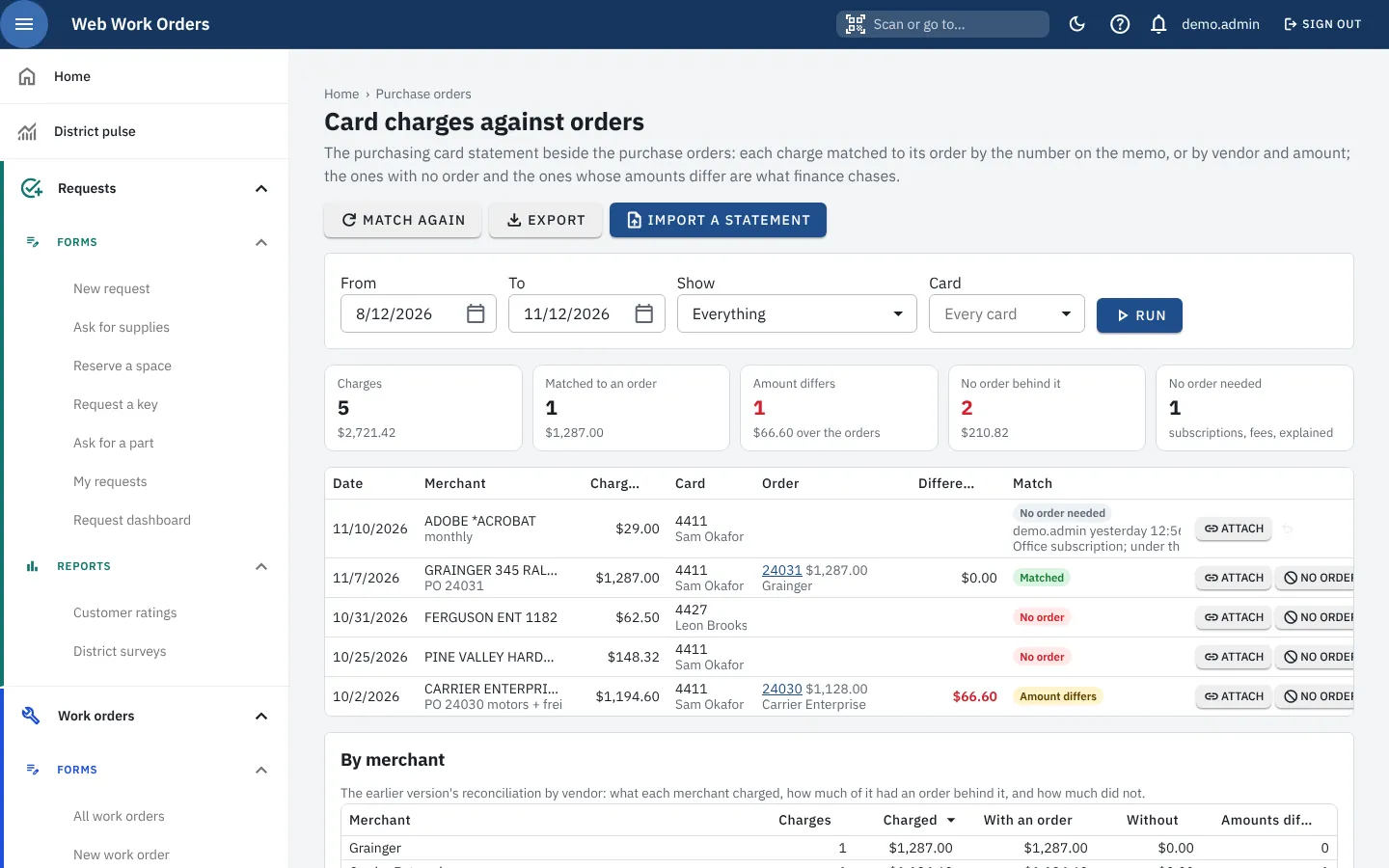
The purchasing card statement matched to purchase orders, the earlier version's reconciliation reports in one place: charges with an order and whether the amounts agree, charges with no order behind them, and totals by merchant.
How it helps
Import the purchasing card statement as the bank exports it; every charge finds its order by the number on the memo, or by vendor and amount. What is left is the list finance wants: charges with no order behind them, amounts that differ, totals by merchant. A charge that needs no order is settled with a reason and stays settled.
Who uses it
How to use it
- Import a statement as the bank exports it; columns are found by name and charges already on file are skipped, so a statement can be imported twice without harm.
- A charge matches by the order number on its memo or reference, else by the vendor's name in the merchant text with an amount within the tolerance (Admin, bottom of the page).
- Attach to order and No order needed settle a charge by hand, with a note; the undo arrow lets the matcher try again. Match again re-runs the matcher after new orders were entered.
- Export gives every charge with its order, the order's total and the difference.
Where to find it
In the app at /purchasing/cards. Every screen has a ? in the header with help for that page.
Terms on this page
Purchase orderVendorPurchasing card
Related
Screenshots come from the Pine Valley Schools demo, a made-up district. Something unclear or out of date? Tell us and we'll fix it.