Routing rule
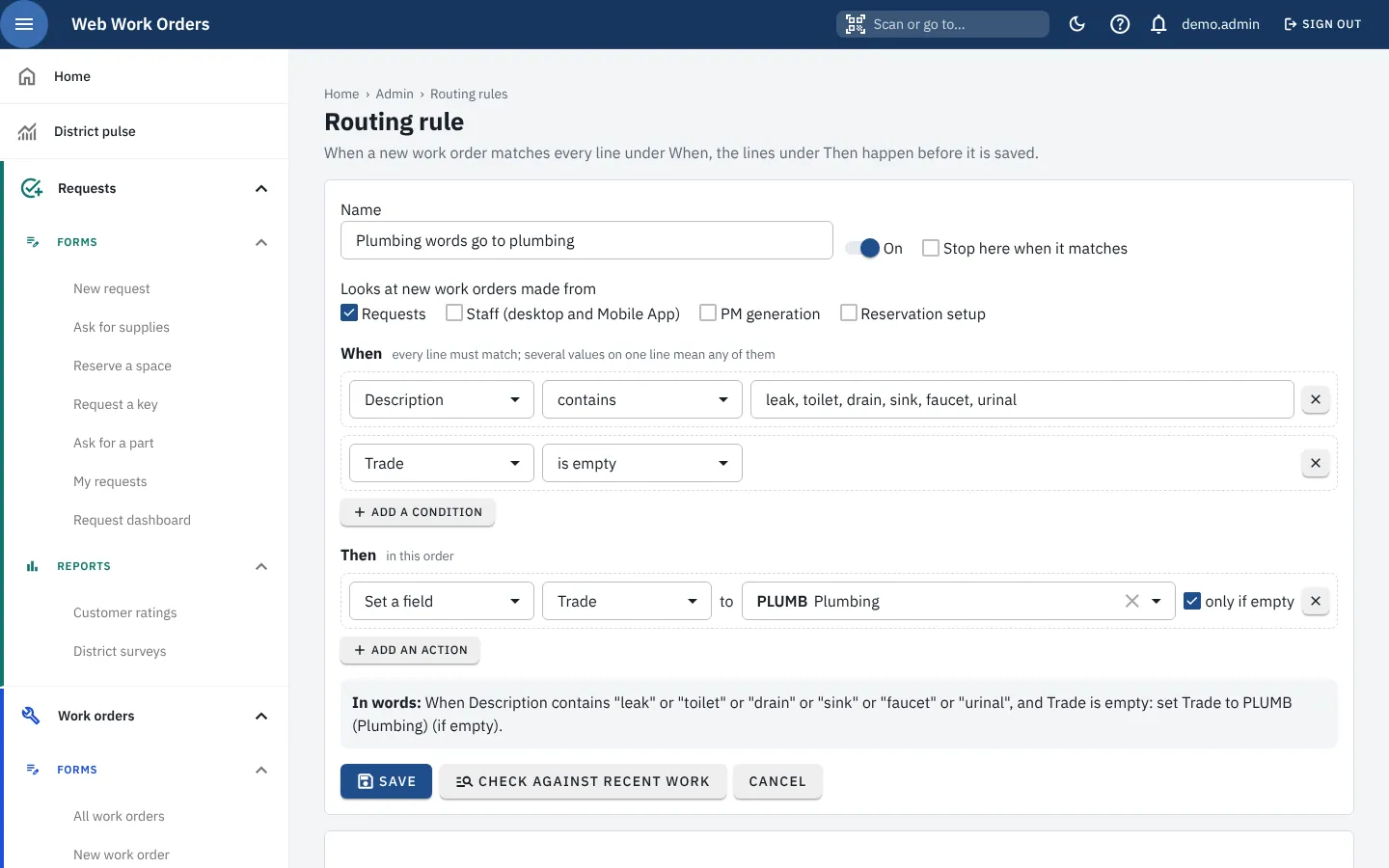
One routing rule: when a new work order matches every line under When, the lines under Then happen before it is saved.
How it helps
One rule: when a new work order matches every line under When, the lines under Then happen before it is saved. The In words line spells the rule out so anyone can check it, and Check against recent work shows what it would have matched.
Who uses it
How to use it
- Several values on one line mean any of them (trade is Plumbing or HVAC). Location "is in (or under)" a school covers every room in it.
- Only if empty keeps what the requester or the person typing chose.
- Assign can name a technician, pick the trade's technician for that building (their home location under Admin → Employees), the one with the fewest open work orders, or each in turn.
- Check against recent work lists the last 90 days' work orders the conditions match. Try it on one work order shows what would change, without saving anything.
Where to find it
In the app at /admin/routing/…. Every screen has a ? in the header with help for that page.
Terms on this page
Work orderRequesterTradeRoomRouting rule
Related
Next in Setup and security: Request form setup →
Screenshots come from the Pine Valley Schools demo, a made-up district. Something unclear or out of date? Tell us and we'll fix it.