Parts and extra information
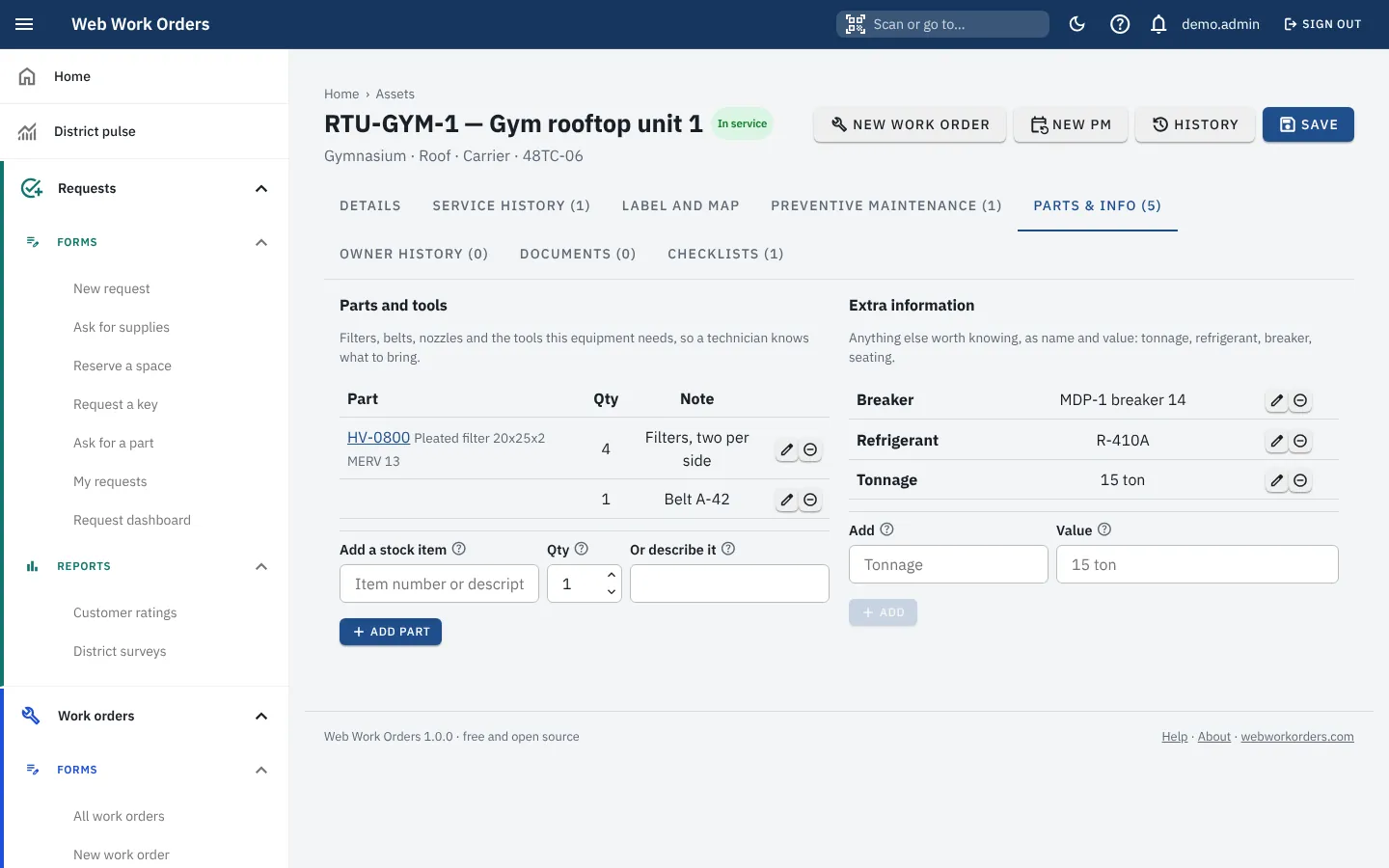
The filters, belts, nozzles and tools a piece of equipment takes, linked to stock items, plus any other facts about it as name-and-value lines.
How it helps
The technician brings the right filter the first time. Knowing the breaker and the refrigerant before climbing on the roof saves a trip down the ladder.
Who uses it
TechniciansSupervisorsStockroom (inventory clerks)
How to use it
- Add a part from stock with its quantity, or describe one that is not stocked.
- Extra information holds anything the asset form has no box for: tonnage, refrigerant, breaker, seating, filter size.
- Parts linked to stock can be issued straight to a work order on the equipment.
Fields on this screen
- Stock item
- A stock item this equipment uses, such as its filter or belt, so it can be issued straight to a work order.
- Quantity
- How many of the part the equipment takes at a time.
- Describe it
- A part or tool that is not a stock item, or a note about the stock item.
- Name
- What the piece of information is called, such as Tonnage or Breaker.
- Value
- The information itself, such as 15 ton or MDP-1 breaker 14.
Terms on this page
Related
Next in Assets: Owner history →
Screenshots come from the Pine Valley Schools demo, a made-up district. Something unclear or out of date? Tell us and we'll fix it.